
Windows Server Update Service (WSUS) and Windows Activation Service (KMS) of Region eu-nl will be migrated to new servers on February 3rd, 2025
Migration Information
Section titled “Migration Information”New Servers of Windows Server Update Service (WSUS) and Windows Activation Service (KMS) in Region eu-nl have been set up to support latest MS features and products e.g. Windows Server 2025. These servers have new IP addresses and will be activated by changing the DNS entries on February 3rd, 2025.
If the DNS names below are used, the Windows servers will use the new servers automatically.
WSUS and KMS clients must be reconfigured manually, if IP addresses or different DNS names are used.
!! Please check the connection to new IPs and verify your security group and firewall rules as well (see https://imagefactory.otc.t-systems.com/home/public-services-in-otc-new-ip-addresses).
- affected region:
- eu-nl
- affected DNS names:
- wsus.eu-nl.otc-service.com
- kms.eu-nl.otc-service.com
- old IP addresses:
- 100.125.1.18
- 100.125.1.17
- new IP address:
- 198.19.48.54
- used ports:
- KMS: 1688
- WSUS: 443,80
How to check KMS configuration
Section titled “How to check KMS configuration”start administrative PowerShell console and run:
C:\Windows\System32\cscript.exe C:\Windows\System32\slmgr.vbs /dlvresult should be:
PS C:\Users\Administrator> C:\Windows\System32\cscript.exe C:\Windows\System32\slmgr.vbs /dlvMicrosoft (R) Windows Script Host Version 5.812Copyright (C) Microsoft Corporation. All rights reserved.
Software licensing service version: 10.0.17763.6766
Name: Windows(R), ServerStandard editionDescription: Windows(R) Operating System, VOLUME_KMSCLIENT channelActivation ID: de32eafd-aaee-4662-9444-c1befb41bde2Application ID: 55c92734-d682-4d71-983e-d6ec3f16059fExtended PID: 03612-04297-000-000000-03-1033-17763.0000-3282020Product Key Channel: Volume:GVLKInstallation ID: 557159519474405683922343544136832730677941291671080563535331844Partial Product Key: J464CLicense Status: LicensedVolume activation expiration: 256514 minute(s) (179 day(s))Remaining Windows rearm count: 1000Remaining SKU rearm count: 1000Trusted time: 1/16/2025 12:11:29 PMConfigured Activation Type: All
Most recent activation information:Key Management Service client information    Client Machine ID (CMID): 56a97207-4dfa-4384-9f4c-1c119bbe5caa    Registered KMS machine name: kms.eu-nl.otc-service.com:1688    KMS machine IP address: 198.19.48.54    KMS machine extended PID: 03612-04573-000-058292-03-1033-17763.0000-3092021    Activation interval: 120 minutes    Renewal interval: 10080 minutes    KMS host caching is enabled
How to check connection to new WSUS (KMS) server
Section titled “How to check connection to new WSUS (KMS) server”start administrative PowerShell console and run:
Test-NetConnection 198.19.48.54 -port 80Test-NetConnection 198.19.48.54 -port 443Test-NetConnection 198.19.48.54 -port 1688test result should be:
TcpTestSucceeded : Trueexample:
PS C:\Users\Administrator> Test-NetConnection 198.19.48.54 -port 80
ComputerName     : 198.19.48.54RemoteAddress    : 198.19.48.54RemotePort       : 80InterfaceAlias   : tapb0b3ceda-12SourceAddress    : 192.168.1.11TcpTestSucceeded : True
How to reconfigure KMS client
Section titled “How to reconfigure KMS client”start administrative PowerShell console and set the kms server:
C:\Windows\System32\cscript.exe C:\Windows\System32\slmgr.vbs /skms kms.eu-nl.otc-service.comresult should be:
Key Management Service machine name set to kms.eu-nl.otc-service.com successfully.start the server activation
C:\Windows\System32\cscript.exe C:\Windows\System32\slmgr.vbs /atoresult should be:
Activating Windows(R), ServerStandard edition (de32eafd-aaee-4662-9444-c1befb41bde2) ...Product activated successfully.How to check WSUS client configuration
Section titled “How to check WSUS client configuration”WSUS client should be configured by group policy.
start gpedit.msc
navigate to Local Computer Policy / Computer Configuration / Administrative Templates / Windows Components / Windows Update / Specify intranet Microsoft update service location and enter the wsus url: http://wsus.eu-nl.otc-service.com or https://wsus.eu-nl.otc-service.com
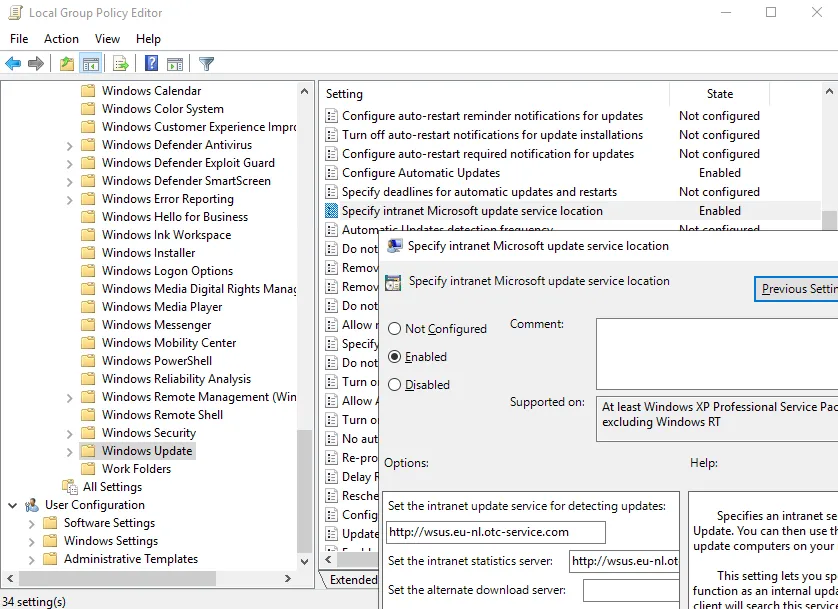
these settings can be verified in registry as well:
[HKEY_LOCAL_MACHINE\SOFTWARE\Policies\Microsoft\Windows\WindowsUpdate]"WUServer"="http://wsus.eu-nl.otc-service.com""WUStatusServer"="http://wsus.eu-nl.otc-service.com"