
Deploy a Kubernetes Cluster on OpenStack using Kubespray
 Photo by Albin Berlin from Pexels
Kubernetes has quickly become the open-source standard solution for deployment, scaling and management of container applications. It offers a high degree of flexibility and versatility. But what leads to a large and powerful documentation, this can be overwhelming for one or the other, when trying to find the relevant sections for his installation. Which is why Kubernetes has a steep learning curve. After the planning of the cluster follows the installation which also has its pitfalls. For this reason, there are deployment tools such as Kubespray that make this work easier. This story is about the automatic deployment of a Kubernetes cluster, using Kubespray on an OpenStack Cloud (Open Telekom Cloud).
===
Kubespray uses for the automatic deployment of Kubernetes, the provisioning, configuration and application deployment tool Ansible. Kubespray also provides a library for provisioning resources on different cloud platforms. For this purpose, the Infrastructure as Code tool Terraform is used. The Kubespray project currently offers Terraform support for the cloud providers AWS, OpenStack and Packet. This tool, in conjunction with the OpenStack library, is used to provide the infrastructure in this story.
Requirements
Section titled “Requirements”First, we take a look at the prerequisites for the deployment. These are divided into the requirements of Kubespray and provider library. Kubespray requires the following components:
- Python 2.7 (or newer)
- Ansible 2.7 (or newer)
- Jinja 2.9 (or newer)
OpenStack provider library requirements:
- Terraform 0.11 (or newer)
To install Terraform it is necessary to download a suitable package from the Hashicorp website. And unpack it. Then the path to the unpacked binary has to be stored in the PATH variable. With the command “terraform” you can test if the installation was successful. Additional information can be found under the following link.
Depending on the operating system, Ansible can be installed with only a few commands. Please refer to the following Ansible documentation. In this story I use Ubuntu and the installation of Ansible is done as follows.
sudo apt updatesudo apt install ansibleAfterwards, the dependencies of Kubespray have to be installed. This is done with the following command. The repository needs to be cloned first. git clone https://github.com/kubernetes-sigs/kubespray
sudo pip install -r requirements.txtTo use the Open Telekom Cloud it is necessary to set your access data using the .ostackrc in the home directory and load the environment variables.
Cluster Planning
Section titled “Cluster Planning”Due to its high flexibility, Kubernetes offers many possibilities to adapt the cluster to your own needs. The consideration of the multitude of possibilities is not part of this story. But can be read in the Kubernetes documentation under Creating a Custom Cluster from Scratch. For the exemplary deployment we will create a cluster consisting of a master, on which the etcd also runs, and two worker nodes. Likewise, the cluster will not have a floating IP and will therefore not be accessible from the Internet.
Another choice to make is that of the CNI (Container Network Interface). There are several choices (cilium, calico, flannel, weave net, …). For our example we use flannel, this works out-of-the-box. Calico would also be a possibility, only OpenStack neutron ports have to be configured to allow service and pod subnets. In order to control the cluster with the Kubernetes Dashboard after deployment, we will also have it installed.
Setup Cluster Configuration
Section titled “Setup Cluster Configuration”The following commands have to be executed in the repository directory, therefore it is important to fill the variable $CLUSTER with a meaningful name.
cp -LRp contrib/terraform/openstack/sample-inventory \inventory/$CLUSTERcd inventory/$CLUSTERln -s ../../contrib/terraform/openstack/hostsln -s ../../contribAfter running the commands it is necessary to edit the inventory/$CLUSTER/cluster.tf file.
# your Kubernetes cluster name here
cluster_name = "k8s-test-cluster"az_list=["eu-de-01", "eu-de-02"]dns_nameservers=["100.125.4.25", "8.8.8.8"]
# SSH key to use for access to nodespublic_key_path = "~/.ssh/id_rsa.pub"
# image to use for bastion, masters, standalone etcd instances, and nodesimage = "Standard_CentOS_7_latest"
# user on the node (ex. core on Container Linux, ubuntu on Ubuntu, etc.)ssh_user = "linux"
# 0|1 bastion nodesnumber_of_bastions = 0flavor_bastion = "s2.xlarge.4"
# standalone etcdsnumber_of_etcd = 0flavor_etcd = "s2.xlarge.4"
# mastersnumber_of_k8s_masters = 0number_of_k8s_masters_no_etcd = 0number_of_k8s_masters_no_floating_ip = 1number_of_k8s_masters_no_floating_ip_no_etcd = 0flavor_k8s_master = "s2.xlarge.4"
# nodesnumber_of_k8s_nodes = 0number_of_k8s_nodes_no_floating_ip = 2flavor_k8s_node = "s2.xlarge.4"
# GlusterFS# either 0 or more than one#number_of_gfs_nodes_no_floating_ip = 1#gfs_volume_size_in_gb = 150# Container Linux does not support GlusterFSimage_gfs = "Standard_CentOS_7_latest"# May be different from other nodes#ssh_user_gfs = "linux"#flavor_gfs_node = "s2.xlarge.4"
# networkingnetwork_name = "k8s-test-network"external_net = "Externel_Network_ID"subnet_cidr = "192.168.100.0/24"floatingip_pool = "admin_external_net"bastion_allowed_remote_ips = ["0.0.0.0/0"]
The description of the variables can be found under the following link. For this example, we will create a cluster with one Kubernetes master and 2 worker nodes. They will based on the latest CentOS 7 and the “s2.exlarge.4”-flavor. The etcd will also installed on the master.
Infrastructure Deployment
Section titled “Infrastructure Deployment”Now we are ready to deploy our cluster infrastructure with Terraform. For a better overview the following diagram shows how it looks like after deployment. This will be extended during the story.
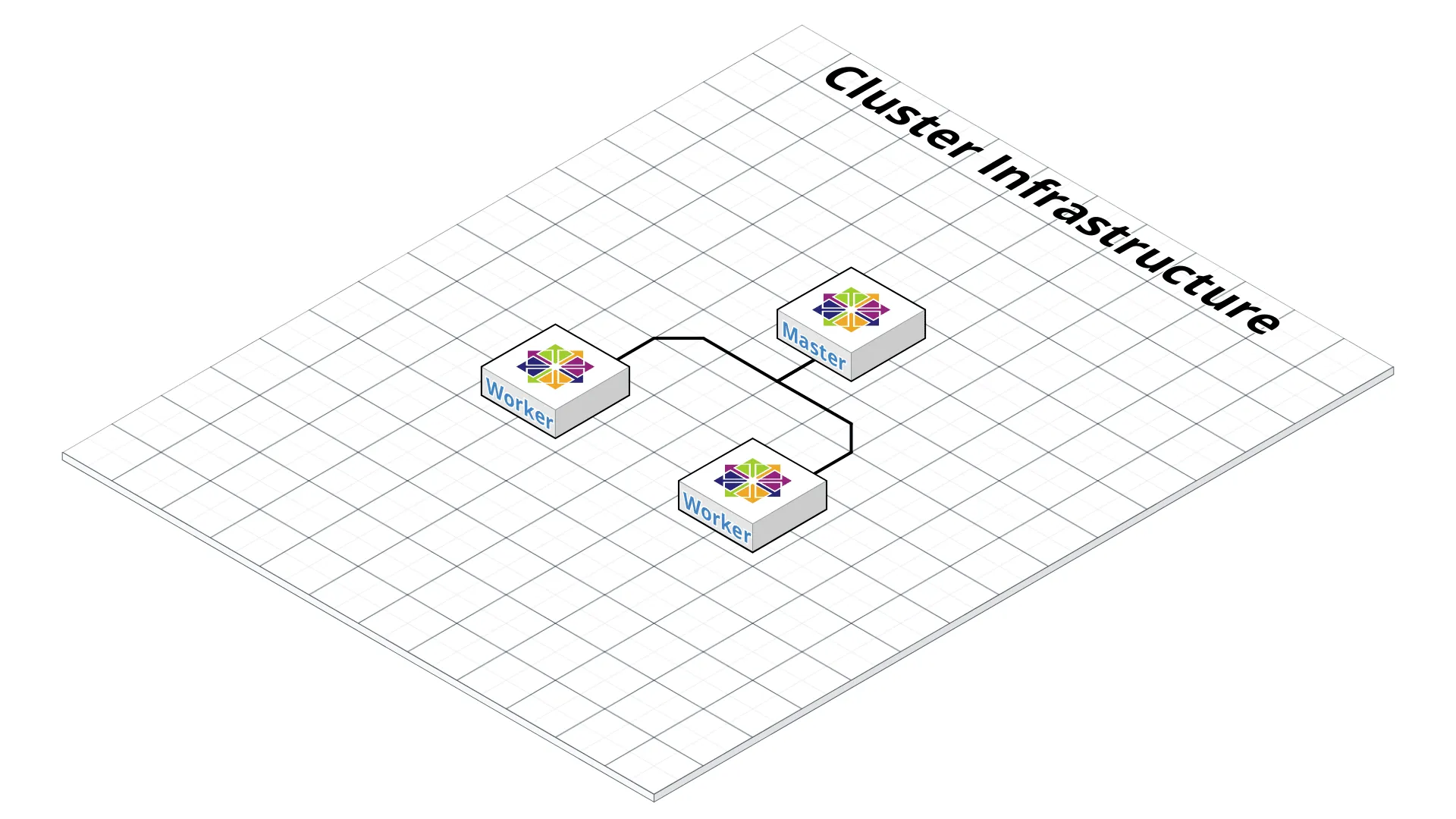 Diagram by Robert Neumann
To start the Terraform deployment change to the inventory/$CLUSTER/ directory and run the following commands. Fist we need to install the required plugins. This will be done by the init argument and the path to the plugins.
terraform init ../../contrib/terraform/openstackThis finsh really fast. At this stage Terraform is ready to deploy the infrastructure. Which can be performed by the apply argument.
terraform apply -var-file=cluster.tf ../../contrib/terraform/openstackAfter some seconds Terraform should show the result like the following and the instances are reachable.
Apply complete! Resources: 3 added, 0 changed, 0 destroyed.to check if the servers are reachable, the following Ansible command can be executed. Before we have to change to the root folder of the repository.
$ ansible -i inventory/$CLUSTER/hosts -m ping allexample-k8s_node-1 | SUCCESS => { "changed": false, "ping": "pong"}example-etcd-1 | SUCCESS => { "changed": false, "ping": "pong"}example-k8s-master-1 | SUCCESS => { "changed": false, "ping": "pong"}Kubernetes Cluster Deployment
Section titled “Kubernetes Cluster Deployment”The infrastructure is deployed, and the next step is the installation of the Kubernetes Cluster. First, we need to configure the cluster variables. One of these files is inventory/$CLUSTER/group_vars/all/all.yml. Importent in this file is to set the cloud_provider to “openstack” and bin_dir to the path where the binaries will be installed. For the example cluster we use the following config.
## Directory where etcd data storedetcd_data_dir: /var/lib/etcd
## Directory where the binaries will be installedbin_dir: /usr/local/bin
## The access_ip variable is used to define how other nodes should access## the node.  This is used in flannel to allow other flannel nodes to see## this node for example.  The access_ip is really useful AWS and Google## environments where the nodes are accessed remotely by the "public" ip,## but don't know about that address themselves.#access_ip: 1.1.1.1

## External LB example config## apiserver_loadbalancer_domain_name: "elb.some.domain"#loadbalancer_apiserver:#  address: 1.2.3.4#  port: 1234
## Internal loadbalancers for apiservers#loadbalancer_apiserver_localhost: true
## Local loadbalancer should use this port instead, if defined.## Defaults to kube_apiserver_port (6443)#nginx_kube_apiserver_port: 8443
### OTHER OPTIONAL VARIABLES## For some things, kubelet needs to load kernel modules.  For example, dynamic kernel services are needed## for mounting persistent volumes into containers.  These may not be loaded by preinstall kubernetes## processes.  For example, ceph and rbd backed volumes.  Set to true to allow kubelet to load kernel## modules.#kubelet_load_modules: false
## Upstream dns servers used by dnsmasq#upstream_dns_servers:#  - 8.8.8.8#  - 8.8.4.4
## There are some changes specific to the cloud providers## for instance we need to encapsulate packets with some network plugins## If set the possible values are either 'gce', 'aws', 'azure', 'openstack', 'vsphere', 'oci', or 'external'## When openstack is used make sure to source in the openstack credentials## like you would do when using nova-client before starting the playbook.## Note: The 'external' cloud provider is not supported.## TODO(riverzhang): https://kubernetes.io/docs/tasks/administer-cluster/running-cloud-controller/#running-cloud-controller-managercloud_provider: openstack
## Set these proxy values in order to update package manager and docker daemon to use proxies#http_proxy: ""#https_proxy: ""
## Refer to roles/kubespray-defaults/defaults/main.yml before modifying no_proxy#no_proxy: ""
## Some problems may occur when downloading files over https proxy due to ansible bug## https://github.com/ansible/ansible/issues/32750. Set this variable to False to disable## SSL validation of get_url module. Note that kubespray will still be performing checksum validation.#download_validate_certs: False
## If you need exclude all cluster nodes from proxy and other resources, add other resources here.#additional_no_proxy: ""
## Certificate Management## This setting determines whether certs are generated via scripts.## Chose 'none' if you provide your own certificates.## Option is  "script", "none"## note: vault is removed#cert_management: script
## Set to true to allow pre-checks to fail and continue deployment#ignore_assert_errors: false
## The read-only port for the Kubelet to serve on with no authentication/authorization. Uncomment to enable.#kube_read_only_port: 10255
## Set true to download and cache containerdownload_container: false
## Deploy container engine# Set false if you want to deploy container engine manually.#deploy_container_engine: true
## Set Pypi repo and cert accordingly#pyrepo_index: https://pypi.example.com/simple#pyrepo_cert: /etc/ssl/certs/ca-certificates.crt
Next, we need to configure the inventory/$CLUSTER/group_vars/k8s-cluster/k8s-cluster.yml file. Edit the kube_network_plugin variable to flannel or calico (requires to configure OpenStack Neutron ports). In our example we use flannel which works out-of-the-box. We have also configure the variable resolvconf_mode we will use “docker_dns”. By this value Kubespray will set up the docker daemon flags. The example configuration for our cluster is shown below.
# Kubernetes configuration dirs and system namespace.# Those are where all the additional config stuff goes# the kubernetes normally puts in /srv/kubernetes.# This puts them in a sane location and namespace.# Editing those values will almost surely break something.kube_config_dir: /etc/kuberneteskube_script_dir: "{{ bin_dir }}/kubernetes-scripts"kube_manifest_dir: "{{ kube_config_dir }}/manifests"
# This is where all the cert scripts and certs will be locatedkube_cert_dir: "{{ kube_config_dir }}/ssl"
# This is where all of the bearer tokens will be storedkube_token_dir: "{{ kube_config_dir }}/tokens"
# This is where to save basic auth filekube_users_dir: "{{ kube_config_dir }}/users"
kube_api_anonymous_auth: true
## Change this to use another Kubernetes version, e.g. a current beta releasekube_version: v1.13.3
# kubernetes image repo definekube_image_repo: "gcr.io/google-containers"
# Where the binaries will be downloaded.# Note: ensure that you've enough disk space (about 1G)local_release_dir: "/tmp/releases"# Random shifts for retrying failed ops like pushing/downloadingretry_stagger: 5
# This is the group that the cert creation scripts chgrp the# cert files to. Not really changeable...kube_cert_group: kube-cert
# Cluster Loglevel configurationkube_log_level: 2
# Directory where credentials will be storedcredentials_dir: "{{ inventory_dir }}/credentials"
# Users to create for basic auth in Kubernetes API via HTTP# Optionally add groups for userkube_api_pwd: "{{ lookup('password', credentials_dir + '/kube_user.creds length=15 chars=ascii_letters,digits') }}"kube_users:  kube:    pass: "{{kube_api_pwd}}"    role: admin    groups:      - system:masters
## It is possible to activate / deactivate selected authentication methods (basic auth, static token auth)#kube_oidc_auth: false#kube_basic_auth: false#kube_token_auth: false

## Variables for OpenID Connect Configuration https://kubernetes.io/docs/admin/authentication/## To use OpenID you have to deploy additional an OpenID Provider (e.g Dex, Keycloak, ...)
# kube_oidc_url: https:// ...# kube_oidc_client_id: kubernetes## Optional settings for OIDC# kube_oidc_ca_file: "{{ kube_cert_dir }}/ca.pem"# kube_oidc_username_claim: sub# kube_oidc_username_prefix: oidc:# kube_oidc_groups_claim: groups# kube_oidc_groups_prefix: oidc:

# Choose network plugin (cilium, calico, contiv, weave or flannel)# Can also be set to 'cloud', which lets the cloud provider setup appropriate routingkube_network_plugin: flannel
# Setting multi_networking to true will install Multus: https://github.com/intel/multus-cnikube_network_plugin_multus: false
# Kubernetes internal network for services, unused block of space.kube_service_addresses: 10.233.0.0/18
# internal network. When used, it will assign IP# addresses from this range to individual pods.# This network must be unused in your network infrastructure!kube_pods_subnet: 10.233.64.0/18
# internal network node size allocation (optional). This is the size allocated# to each node on your network.  With these defaults you should have# room for 4096 nodes with 254 pods per node.kube_network_node_prefix: 24
# The port the API Server will be listening on.kube_apiserver_ip: "{{ kube_service_addresses|ipaddr('net')|ipaddr(1)|ipaddr('address') }}"kube_apiserver_port: 6443 # (https)#kube_apiserver_insecure_port: 8080 # (http)# Set to 0 to disable insecure port - Requires RBAC in authorization_modes and kube_api_anonymous_auth: truekube_apiserver_insecure_port: 0 # (disabled)
# Kube-proxy proxyMode configuration.# Can be ipvs, iptableskube_proxy_mode: ipvs
# A string slice of values which specify the addresses to use for NodePorts.# Values may be valid IP blocks (e.g. 1.2.3.0/24, 1.2.3.4/32).# The default empty string slice ([]) means to use all local addresses.# kube_proxy_nodeport_addresses_cidr is retained for legacy configkube_proxy_nodeport_addresses: >-  {%- if kube_proxy_nodeport_addresses_cidr is defined -%}  [{{ kube_proxy_nodeport_addresses_cidr }}]  {%- else -%}  []  {%- endif -%}
# If non-empty, will use this string as identification instead of the actual hostname#kube_override_hostname: >-#  {%- if cloud_provider is defined and cloud_provider in [ 'aws' ] -%}#  {%- else -%}#  {{ inventory_hostname }}#  {%- endif -%}
## Encrypting Secret Data at Rest (experimental)kube_encrypt_secret_data: false
# DNS configuration.# Kubernetes cluster name, also will be used as DNS domaincluster_name: cluster.local# Subdomains of DNS domain to be resolved via /etc/resolv.conf for hostnet podsndots: 2# Can be dnsmasq_kubedns, kubedns, coredns, coredns_dual, manual or nonedns_mode: coredns# Set manual server if using a custom cluster DNS server#manual_dns_server: 10.x.x.x# Enable nodelocal dns cacheenable_nodelocaldns: Falsenodelocaldns_ip: 169.254.25.10
# Can be docker_dns, host_resolvconf or noneresolvconf_mode: docker_dns# Deploy netchecker app to verify DNS resolve as an HTTP servicedeploy_netchecker: false# Ip address of the kubernetes skydns serviceskydns_server: "{{ kube_service_addresses|ipaddr('net')|ipaddr(3)|ipaddr('address') }}"skydns_server_secondary: "{{ kube_service_addresses|ipaddr('net')|ipaddr(4)|ipaddr('address') }}"dnsmasq_dns_server: "{{ kube_service_addresses|ipaddr('net')|ipaddr(2)|ipaddr('address') }}"dns_domain: "{{ cluster_name }}"
## Container runtime## docker for docker and crio for cri-o.container_manager: docker
## Settings for containerized control plane (etcd/kubelet/secrets)etcd_deployment_type: dockerkubelet_deployment_type: hosthelm_deployment_type: host
# K8s image pull policy (imagePullPolicy)k8s_image_pull_policy: IfNotPresent
# audit log for kuberneteskubernetes_audit: false
# dynamic kubelet configurationdynamic_kubelet_configuration: false
# define kubelet config dir for dynamic kubelet#kubelet_config_dir:default_kubelet_config_dir: "{{ kube_config_dir }}/dynamic_kubelet_dir"dynamic_kubelet_configuration_dir: "{{ kubelet_config_dir | default(default_kubelet_config_dir) }}"
# pod security policy (RBAC must be enabled either by having 'RBAC' in authorization_modes or kubeadm enabled)podsecuritypolicy_enabled: false
# Make a copy of kubeconfig on the host that runs Ansible in {{ inventory_dir }}/artifacts# kubeconfig_localhost: false# Download kubectl onto the host that runs Ansible in {{ bin_dir }}# kubectl_localhost: false
# dnsmasq# dnsmasq_upstream_dns_servers:#  - /resolvethiszone.with/10.0.4.250#  - 8.8.8.8
#  Enable creation of QoS cgroup hierarchy, if true top level QoS and pod cgroups are created. (default true)# kubelet_cgroups_per_qos: true
# A comma separated list of levels of node allocatable enforcement to be enforced by kubelet.# Acceptable options are 'pods', 'system-reserved', 'kube-reserved' and ''. Default is "".# kubelet_enforce_node_allocatable: pods
## Supplementary addresses that can be added in kubernetes ssl keys.## That can be useful for example to setup a keepalived virtual IP# supplementary_addresses_in_ssl_keys: [10.0.0.1, 10.0.0.2, 10.0.0.3]
## Running on top of openstack vms with cinder enabled may lead to unschedulable pods due to NoVolumeZoneConflict restriction in kube-scheduler.## See https://github.com/kubernetes-sigs/kubespray/issues/2141## Set this variable to true to get rid of this issuevolume_cross_zone_attachment: false# Add Persistent Volumes Storage Class for corresponding cloud provider ( OpenStack is only supported now )persistent_volumes_enabled: false
## Container Engine Acceleration## Enable container acceleration feature, for example use gpu acceleration in containers# nvidia_accelerator_enabled: true## Nvidia GPU driver install. Install will by done by a (init) pod running as a daemonset.## Important: if you use Ubuntu then you should set in all.yml 'docker_storage_options: -s overlay2'## Array with nvida_gpu_nodes, leave empty or comment if you dont't want to install drivers.## Labels and taints won't be set to nodes if they are not in the array.# nvidia_gpu_nodes:#   - kube-gpu-001# nvidia_driver_version: "384.111"## flavor can be tesla or gtx# nvidia_gpu_flavor: gtx
Last, we need to edit the inventory/$CLUSTER/group_vars/k8s-cluster/addons.yml to enable the dashboard installation by setting the variable dashboard_enabled to “true”. You can use the example configuration below.
# Kubernetes dashboard# RBAC required. see docs/getting-started.md for access details.dashboard_enabled: true
# Helm deploymenthelm_enabled: false
# Registry deploymentregistry_enabled: false# registry_namespace: kube-system# registry_storage_class: ""# registry_disk_size: "10Gi"
# Metrics Server deploymentmetrics_server_enabled: false# metrics_server_kubelet_insecure_tls: true# metrics_server_metric_resolution: 60s# metrics_server_kubelet_preferred_address_types: "InternalIP"
# Local volume provisioner deploymentlocal_volume_provisioner_enabled: false# local_volume_provisioner_namespace: kube-system# local_volume_provisioner_storage_classes:#   local-storage:#     host_dir: /mnt/disks#     mount_dir: /mnt/disks#   fast-disks:#     host_dir: /mnt/fast-disks#     mount_dir: /mnt/fast-disks#     block_cleaner_command:#       - "/scripts/shred.sh"#       - "2"#     volume_mode: Filesystem#     fs_type: ext4
# CephFS provisioner deploymentcephfs_provisioner_enabled: false# cephfs_provisioner_namespace: "cephfs-provisioner"# cephfs_provisioner_cluster: ceph# cephfs_provisioner_monitors: "172.24.0.1:6789,172.24.0.2:6789,172.24.0.3:6789"# cephfs_provisioner_admin_id: admin# cephfs_provisioner_secret: secret# cephfs_provisioner_storage_class: cephfs# cephfs_provisioner_reclaim_policy: Delete# cephfs_provisioner_claim_root: /volumes# cephfs_provisioner_deterministic_names: true
# Nginx ingress controller deploymentingress_nginx_enabled: false# ingress_nginx_host_network: false# ingress_nginx_nodeselector:#   node.kubernetes.io/node: ""# ingress_nginx_tolerations:#   - key: "node.kubernetes.io/master"#     operator: "Equal"#     value: ""#     effect: "NoSchedule"# ingress_nginx_namespace: "ingress-nginx"# ingress_nginx_insecure_port: 80# ingress_nginx_secure_port: 443# ingress_nginx_configmap:#   map-hash-bucket-size: "128"#   ssl-protocols: "SSLv2"# ingress_nginx_configmap_tcp_services:#   9000: "default/example-go:8080"# ingress_nginx_configmap_udp_services:#   53: "kube-system/kube-dns:53"
# Cert manager deploymentcert_manager_enabled: false# cert_manager_namespace: "cert-manager"
After configuration editing we need to run the Ansible-Playbook with the parameter to the configuration by the following command.
ansible-playbook --become -i inventory/$CLUSTER/hosts cluster.ymlAnsible goes through several steps, if all steps are successful, your cluster looks like in the following diagram.
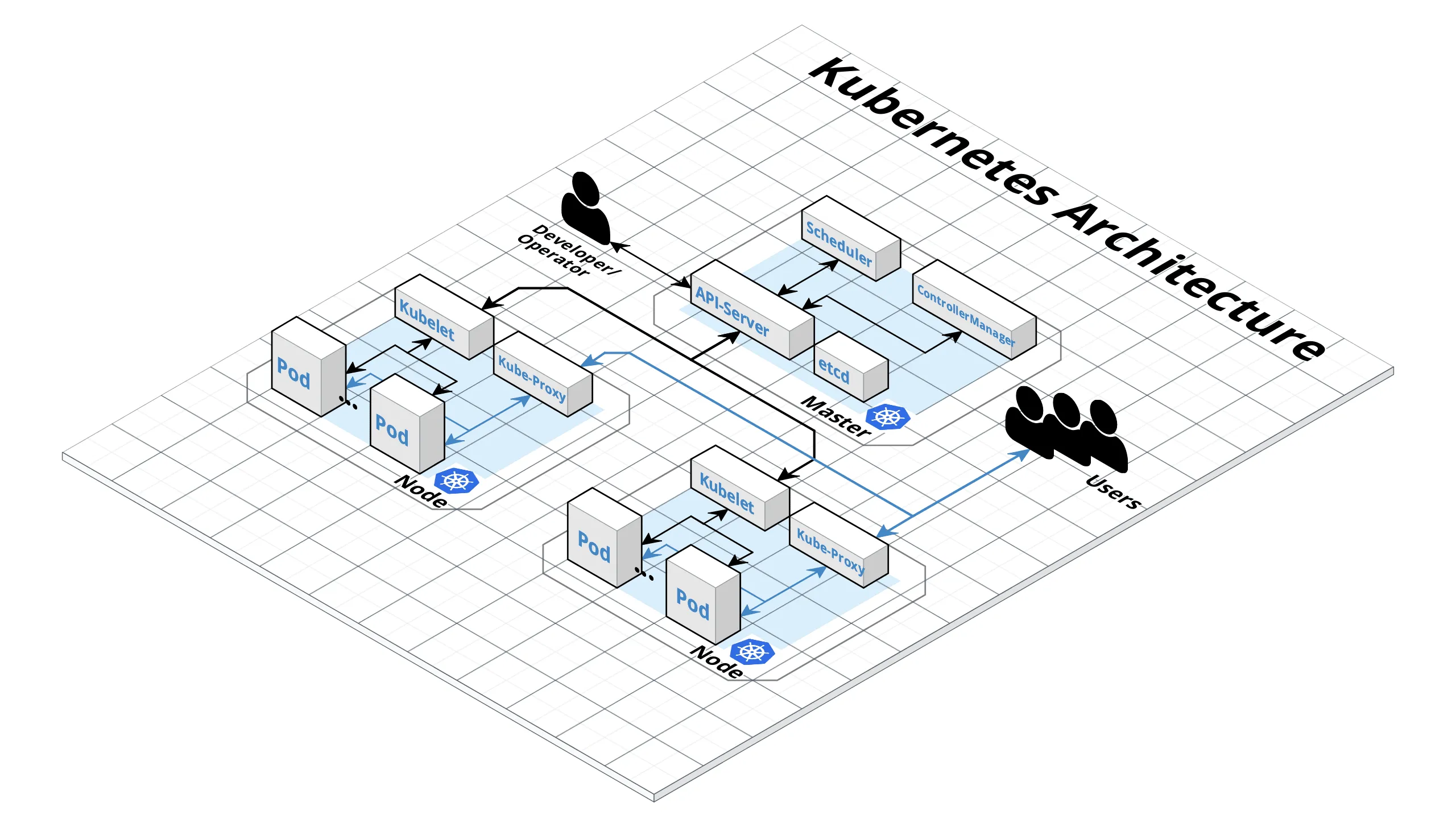 Diagram by Robert Neumann
Testing
Section titled “Testing”For testing you cluster you have to login to the Kubernetes Master, switch to the root user and use the kubectl tool to get the cluster information by the kubectl cluster-info command. It will show the endpoint information of the master and the services in the cluster. If your cluster looks good you need to create a Kubernetes dashboard user by the following commands.
# Create service accountkubectl create serviceaccount cluster-admin-dashboard-sa
# Bind ClusterAdmin role to the service accountkubectl create clusterrolebinding cluster-admin-dashboard-sa \  --clusterrole=cluster-admin \  --serviceaccount=default:cluster-admin-dashboard-sa
# Parse the tokenkubectl describe secret $(kubectl -n kube-system get secret | awk '/^cluster-admin-dashboard-sa-token-/{print $1}') | awk '$1=="token:"{print $2}'
With the token it is now possible to login to the dashboard. But first you need to create a tunnel to your Kubernetes Master because the Dashboard is still open for localhost at port 8001. After that you can reach the dashboard under the URL localhost:8001. Now you can use your token to login by selecting “Token and enter it.
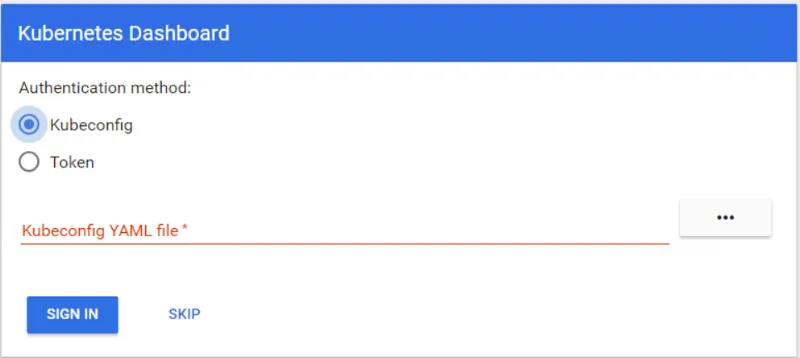
Image by Robert Neumann
Now we are ready to work with the Kubernetes Cluster. This tutorial shows how easy it is to deploy a Kubernetes cluster on an OpenStack cloud and how to take care of it.