
CCE - Kubernetes NGINX Ingress with Sticky Session
The current version of Cloud Container Engine - CCE (CCEv2 with kubernetes 1.11) supports external access to kubernetes applications via Elastic Load Balancer - ELB which has an assigned Elastic IP - EIP. This allows users to access services from outside of OTC which are load balanced to the backend CCE nodes and then reach the applications running on the kubernetes cluster. However this might bring a challange for applications which require session persistance between the client and the specific server (in CCE case it is container in the POD) for the duration of the session (sticky session). The ELB supports sticky session based on IP addresses, but if we consider the nature of kubernetes applications, then this might not be sufficient. Just imagine and application which runs multiple PODs on the same CCE node and the CCE node has only one IP address to which the ELB sends the traffic.
===
One possible solution to this issue is to use NGINX Ingress Controller which supports Sticky sessions with “session cookies”
NGINX Ingress Controller - Sticky Sessions
The following steps in this article will show how to setup a sample environment on CCE using NGINX Ingress controller with Sticky sessions.
Let’s take a look at the target high level architecture:
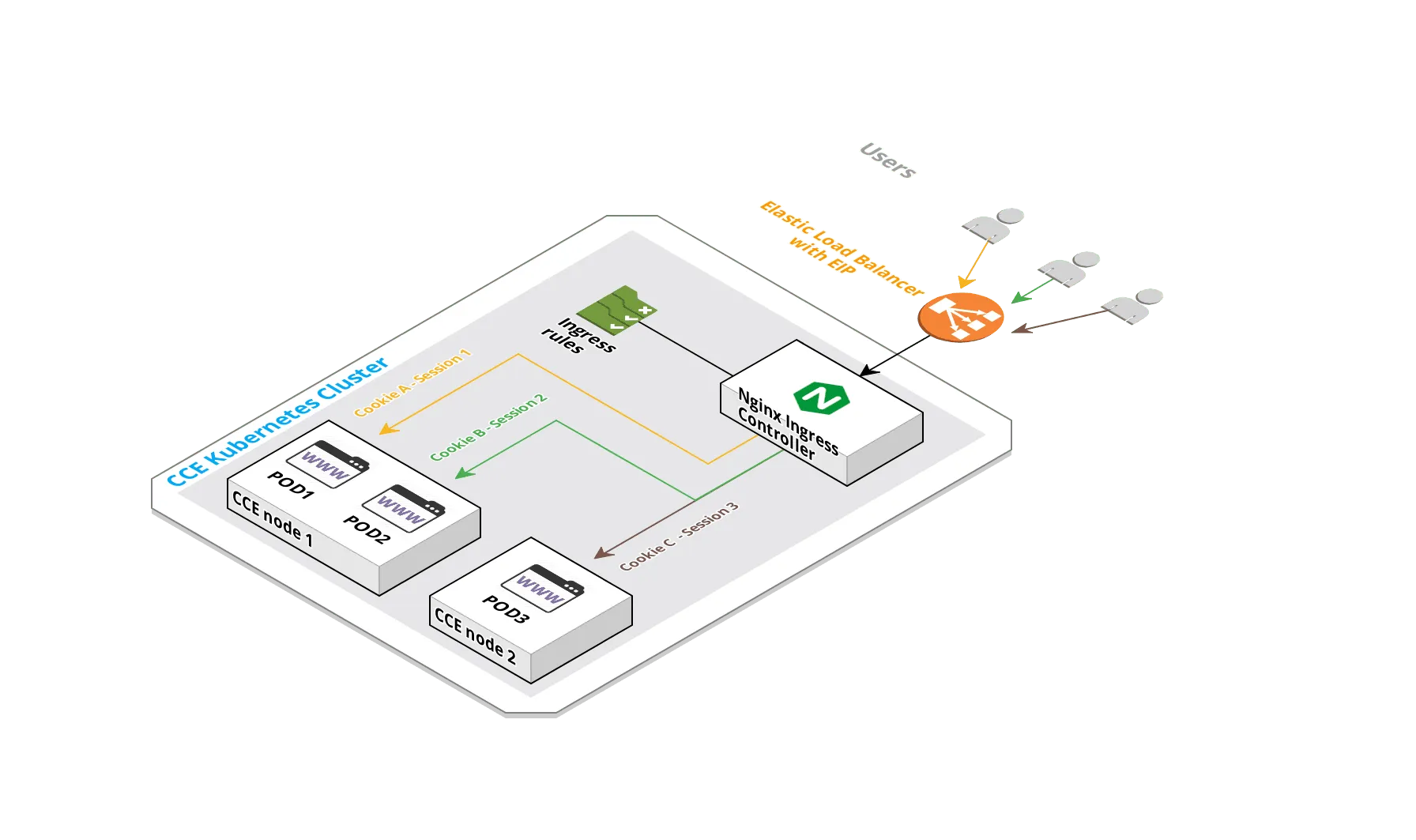 1. High Level architecture
Prerequisite
Section titled “Prerequisite”- A running CCE cluster and an Enhanced Elastic Load Balancer has to be provisioned upfront where both CCE cluster and ELB are in the same VPC/Subnet.
- The CCE cluster has to be version 1.11.x.
- The ELB has to have an Elastic IP assigned
- A server is required from where the CCE cluster can be accessed using the native kubectl client binary
If all works fine, the following command should list the running CCE nodes
[linux@jumphost ~]$ kubectl get nodes -o wideNAME STATUS ROLES AGE VERSION INTERNAL-IP EXTERNAL-IP OS-IMAGE KERNEL-VERSION CONTAINER-RUNTIME192.168.4.211 Ready <none> 1d v1.11.3-r1-CCE2.0.17.B003 192.168.4.211 <none> EulerOS 2.0 (SP2) 3.10.0-327.62.59.83.h112.x86_64 docker://17.6.1192.168.4.217 Ready <none> 1d v1.11.3-r1-CCE2.0.17.B003 192.168.4.217 <none> EulerOS 2.0 (SP2) 3.10.0-327.62.59.83.h112.x86_64 docker://17.6.1Install and Setup the Helm Client
Section titled “Install and Setup the Helm Client”Helm client is used to install the helm chart of NGINX ingress controller. This is the easyiest way to deploy the NGINX ingress controller. Helm client can be installed on the same server where the kubeclt is running and the client can be downloaded here: Helm
Create ServiceAccount and ClusterRoleBinding required for tiller (Tiller is Helm’s server-side component, which the helm client uses to deploy resources.)
[linux@jumphost helm]$ cat service-account.yamlapiVersion: v1kind: ServiceAccountmetadata: name: tiller namespace: kube-system---apiVersion: rbac.authorization.k8s.io/v1beta1kind: ClusterRoleBindingmetadata: name: tillerroleRef: apiGroup: rbac.authorization.k8s.io kind: ClusterRole name: cluster-adminsubjects: - kind: ServiceAccount name: tiller namespace: kube-system[linux@jumphost helm]$ kubectl create -f service-account.yamlserviceaccount "tiller" createdclusterrolebinding.rbac.authorization.k8s.io "tiller" created[linux@jumphost helm]$Install tiller with the ServiceAccount:
[linux@jumphost helm]$ helm init --service-account tiller$HELM_HOME has been configured at /home/linux/.helm.
Tiller (the Helm server-side component) has been installed into your Kubernetes Cluster.
Please note: by default, Tiller is deployed with an insecure 'allow unauthenticated users' policy.To prevent this, run `helm init` with the --tiller-tls-verify flag.For more information on securing your installation see: https://docs.helm.sh/using_helm/#securing-your-helm-installationHappy Helming![linux@jumphost helm]$
Tiller POD should be running and helm version should return both client and server version:
[linux@jumphost ~]$ kubectl get pod -n kube-system tiller-deploy-5946b4745f-7g75nNAME READY STATUS RESTARTS AGEtiller-deploy-5946b4745f-7g75n 1/1 Running 0 6m[linux@jumphost ~]$ helm versionClient: &version.Version{SemVer:"v2.14.1", GitCommit:"5270352a09c7e8b6e8c9593002a73535276507c0", GitTreeState:"clean"}Server: &version.Version{SemVer:"v2.14.1", GitCommit:"5270352a09c7e8b6e8c9593002a73535276507c0", GitTreeState:"clean"}The following command can be used to list all PODs under kube-system namespace and identify the proper name of tiller pod: kubectl get pod -n kube-system | grep tiller
Update the helm repository with the latest charts:
[linux@jumphost helm]$ helm repo updateHang tight while we grab the latest from your chart repositories......Skip local chart repository...Successfully got an update from the "stable" chart repositoryUpdate Complete. ? Happy Helming!?[linux@jumphost helm]$Deploy the NGINX Ingress Controller
Section titled “Deploy the NGINX Ingress Controller”In order to have a running LoadBalancer service with ELB a few parameters specific to OTC in the helm chart have to be customized.
- ELB-IP: controller.service.loadBalancerIP=<external ELB IP address>
- ELB-Class: annotations := controller.service.annotations.“kubernetes.io/elb.class”=union
- ELB-ID: controller.service.annotations.“kubernetes.io/elb.id”=<Elastic Load Balancer ID>
The ELB EIP has to be defined into the loadBalancerIP and set proper annotations. The elb.class has to be set to union and elb.id to the actual ELB ID. The ELB ID and the ELB EIP can be gathered from OTC either via GUI console or API.
Those parameters are set directly in the helm command with –set as seen below.
Install the nginx-ingress controller with helm:
[linux@jumphost ~]$ helm install stable/nginx-ingress --name pluto --set controller.service.loadBalancerIP="80.158.7.80",controller.service.annotations."kubernetes\.io/elb\.class"=union,controller.service.annotations."kubernetes\.io/elb\.id"=c2019e57-0018-4a43-811e-da7da0e49994NAME:   plutoLAST DEPLOYED: Fri Jul 12 09:44:35 2019NAMESPACE: defaultSTATUS: DEPLOYED
RESOURCES:==> v1/Pod(related)NAME                                                  READY  STATUS             RESTARTS  AGEpluto-nginx-ingress-controller-667cc57678-mjk78       0/1    ContainerCreating  0         0spluto-nginx-ingress-controller-667cc57678-pws2t       1/1    Terminating        0         10mpluto-nginx-ingress-default-backend-568b67cb7b-vcrvx  0/1    ContainerCreating  0         0s
==> v1/ServiceNAME                                 TYPE          CLUSTER-IP     EXTERNAL-IP  PORT(S)                     AGEpluto-nginx-ingress-controller       LoadBalancer  10.247.131.73  <pending>    80:32692/TCP,443:32256/TCP  0spluto-nginx-ingress-default-backend  ClusterIP     10.247.97.40   <none>       80/TCP                      0s
==> v1/ServiceAccountNAME                 SECRETS  AGEpluto-nginx-ingress  1        0s
==> v1beta1/ClusterRoleNAME                 AGEpluto-nginx-ingress  0s
==> v1beta1/ClusterRoleBindingNAME                 AGEpluto-nginx-ingress  0s
==> v1beta1/DeploymentNAME                                 READY  UP-TO-DATE  AVAILABLE  AGEpluto-nginx-ingress-controller       0/1    1           0          0spluto-nginx-ingress-default-backend  0/1    1           0          0s
==> v1beta1/RoleNAME                 AGEpluto-nginx-ingress  0s
==> v1beta1/RoleBindingNAME                 AGEpluto-nginx-ingress  0s

NOTES:The nginx-ingress controller has been installed.It may take a few minutes for the LoadBalancer IP to be available.You can watch the status by running 'kubectl --namespace default get services -o wide -w pluto-nginx-ingress-controller'
An example Ingress that makes use of the controller:
  apiVersion: extensions/v1beta1  kind: Ingress  metadata:    annotations:      kubernetes.io/ingress.class: nginx    name: example    namespace: foo  spec:    rules:      - host: www.example.com        http:          paths:            - backend:                serviceName: exampleService                servicePort: 80              path: /    # This section is only required if TLS is to be enabled for the Ingress    tls:        - hosts:            - www.example.com          secretName: example-tls
If TLS is enabled for the Ingress, a Secret containing the certificate and key must also be provided:
  apiVersion: v1  kind: Secret  metadata:    name: example-tls    namespace: foo  data:    tls.crt: <base64 encoded cert>    tls.key: <base64 encoded key>  type: kubernetes.io/tls
[linux@jumphost ~]$
It takes a while till every component is up and running, but eventually the PODs should be in Running STATUS and the LoadBalancer service should have the defined EIP as EXTERNAL-IP:
[linux@jumphost nginx-ingress]$ kubectl get podNAME READY STATUS RESTARTS AGEpluto-nginx-ingress-controller-7f8f47d5ff-xz6pw 1/1 Running 0 12mpluto-nginx-ingress-default-backend-55dffd9f5d-c5n6l 1/1 Running 0 12m[linux@jumphost nginx-ingress]$ kubectl get serviceNAME TYPE CLUSTER-IP EXTERNAL-IP PORT(S) AGEkubernetes ClusterIP 10.247.0.1 <none> 443/TCP 3hpluto-nginx-ingress-controller LoadBalancer 10.247.83.135 80.158.7.80 80:31699/TCP,443:32395/TCP 12mpluto-nginx-ingress-default-backend ClusterIP 10.247.176.141 <none> 80/TCP 12m[linux@jumphost nginx-ingress]$Deploy the Backend Sample Application
Section titled “Deploy the Backend Sample Application”The following YAML manifest files are used to deploy the backend sample application:
[linux@jumphost elb-ingress-sticky]$ cat amsterdam-with-ip.yaml---apiVersion: extensions/v1beta1kind: Deploymentmetadata: creationTimestamp: null labels: run: amsterdam name: amsterdamspec: replicas: 3 selector: matchLabels: run: amsterdam strategy: {} template: metadata: creationTimestamp: null labels: run: amsterdam spec: containers: - image: nginx name: amsterdam volumeMounts: - name: init-web-content mountPath: /usr/share/nginx/html/ initContainers: - name: init-web-content image: busybox:latest command: ["/bin/sh", "-c", "echo Amsterdam - $POD_ID > /tmp/index.html"] volumeMounts: - name: init-web-content mountPath: /tmp env: - name: POD_ID valueFrom: fieldRef: fieldPath: status.podIP volumes: - name: init-web-content hostPath: path: /data---apiVersion: v1kind: Servicemetadata: creationTimestamp: null labels: run: amsterdam name: amsterdam selfLink: /api/v1/namespaces/default/services/amsterdamspec: ports: - port: 80 protocol: TCP targetPort: 80 selector: run: amsterdam sessionAffinity: None type: ClusterIPstatus: loadBalancer: {}[linux@jumphost elb-ingress-sticky]$Created the Deployment and Service related to our sample application:
[linux@jumphost elb-ingress-sticky]$ kubectl create -f amsterdam-with-ip.yamldeployment.extensions/amsterdam createdservice/amsterdam created[linux@jumphost elb-ingress-sticky]$Check the status of the PODs:
[linux@jumphost elb-ingress-sticky]$ kubectl get deployment -l run=amsterdam -o wideNAME DESIRED CURRENT UP-TO-DATE AVAILABLE AGE CONTAINERS IMAGES SELECTORamsterdam 3 3 3 3 4m amsterdam nginx run=amsterdam[linux@jumphost elb-ingress-sticky]$[linux@jumphost elb-ingress-sticky]$ kubectl get pod -l run=amsterdam -o wideNAME READY STATUS RESTARTS AGE IP NODE NOMINATED NODEamsterdam-7858b99884-6dfqp 1/1 Running 0 2m 172.16.0.101 192.168.4.211 <none>amsterdam-7858b99884-c8skr 1/1 Running 0 2m 172.16.0.102 192.168.4.211 <none>amsterdam-7858b99884-cm92p 1/1 Running 0 2m 172.16.0.87 192.168.4.217 <none>[linux@jumphost elb-ingress-sticky]$[linux@jumphost elb-ingress-sticky]$ kubectl get service -l run=amsterdam -o wideNAME TYPE CLUSTER-IP EXTERNAL-IP PORT(S) AGE SELECTORamsterdam ClusterIP 10.247.211.13 <none> 80/TCP 4m run=amsterdam[linux@jumphost ~]$ kubectl describe service amsterdamName: amsterdamNamespace: defaultLabels: run=amsterdamAnnotations: <none>Selector: run=amsterdamType: ClusterIPIP: 10.247.211.13Port: <unset> 80/TCPTargetPort: 80/TCPEndpoints: 172.16.0.101:80,172.16.0.102:80,172.16.0.87:80Session Affinity: NoneEvents: <none>[linux@jumphost ~]$This created a deployment called amsterdam which created 3 PODs, 2 of them are running on the first CCE node and the third POD is running on the second CCE node.
Deploy the NGINX Ingress Rule with Sticky Sessions
Section titled “Deploy the NGINX Ingress Rule with Sticky Sessions”The following YAML manifest is used to deploy the NGINX ingress rule which uses the required annotations to use cookie based sticky session.
For more details on the annotations, please visit the official documentation.
In general http request to host amsterdam.dynu.net on port 80 will be routed to the service amsterdam which has 3 endpoints (these points to the 3 POD IP addresses) as we could see in the previous section.
[linux@jumphost elb-ingress-sticky]$ cat ingress-rules-sticky.yamlapiVersion: extensions/v1beta1kind: Ingressmetadata: name: ingress-rules annotations: nginx.ingress.kubernetes.io/affinity: "cookie" nginx.ingress.kubernetes.io/session-cookie-name: "route" nginx.ingress.kubernetes.io/session-cookie-expires: "172800" nginx.ingress.kubernetes.io/session-cookie-max-age: "172800" nginx.ingress.kubernetes.io/force-ssl-redirect: "false"spec: rules: - host: amsterdam.dynu.net http: paths: - path: / backend: serviceName: amsterdam servicePort: 80[linux@jumphost elb-ingress-sticky]$Deploy the ingress rule:
[linux@jumphost elb-ingress-sticky]$ kubectl create -f ingress-rules-sticky.yamlingress.extensions/ingress-rules created[linux@jumphost elb-ingress-sticky]$Let’s perform a test…
Section titled “Let’s perform a test…”First lets try to access the web application with a http browser on http://amsterdam.dynu.net address. As the browser does not have a cookie yet, the NGINX ingress controller will issue a new cookie which will be stored by the web browser and then routed to the first POD (application container). All subsequent requests will go to the same POD until the cookie is deleted manually or expired.
Proper DNS resolution is required for the tests. In this sample example the dynu.net free service is used and the amsterdam.dynu.net is pointing to the EIP of the ELB.
This can be seen in the following screenshot:
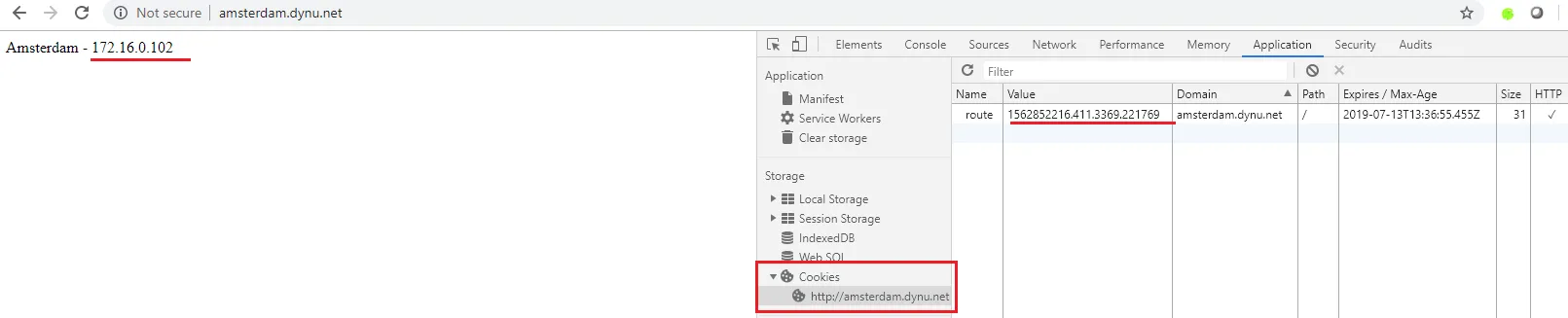 2. Example with cookie1
When the cookie is deleted manually and a new request is sent the NGINX ingress controller issues a new token and routes the traffic to the next POD as we can see in the next screenshot:
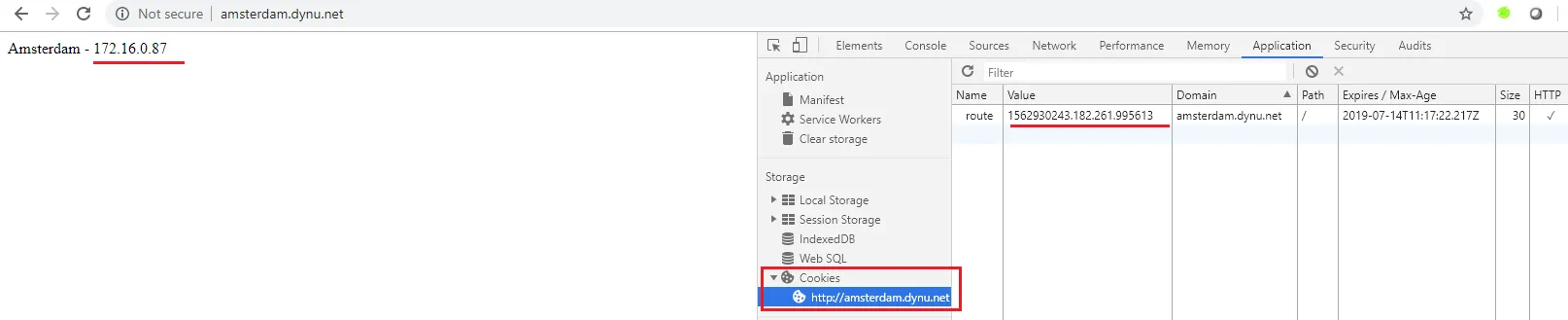 3. Example with cookie2
Further Consideration
Section titled “Further Consideration”- this sample application does not involve TLS encryption which obviously can be achieved in different ways. One option is to terminate the TLS on the nginx-ingress-controller and store the TLS certificates as kubernetes secrets. An example scenario can be found in the official documentation TLS termination
- this sample scenario does not address high availability of the NGINX ingress controller. This is also visible in the ELB listeners that the Backend Server Groups contain only one CCE node, obviously the one on which the pluto-nginx-ingress-controller POD is running as the service used by the NGINX ingress controller is associated with the ELB. One option is to simply scale up the number of replicas of the deployment:
kubectl scale deployment pluto-nginx-ingress-controller --replicas=2